
What Is a Good Bottleneck Percentage for CPU and GPU in a Gaming PC?
Date Published:August 3, 2026
Last Updated:August 9, 2026
The calculator reads 14%. You stare at it, not sure if that’s fine or if you just wasted money on a mismatched build. A forum says under 10% is safe. A YouTube comment calls anything past that “unacceptable.” Your GPU’s spec sheet claims zero bottleneck, period.
So, what is a good bottleneck percentage for a gaming PC? The answer depends on your resolution, game type, and the frame rate you’re targeting.
Nothing is wrong with your build. That number, on its own, tells you almost nothing, and that’s actually the whole point of this guide.
A good bottleneck percentage isn’t one fixed figure. It shifts with your resolution, your game, and what frame rate you’re actually chasing.
This guide breaks down what each range from 0% to 35%+ really means, why 0% never happens on real hardware, and how resolution and game type quietly rewrite your number’s meaning. By the end, you’ll know exactly where your build stands, no guessing.
What Does Bottleneck Percentage Actually Measure?
Bottleneck percentage measures one simple thing: how much performance your faster component is losing because the slower one can’t keep up.
If your calculator shows 14%, that’s not a random score. It’s the share of your GPU’s power sitting unused, frame after frame, because something else in your system can’t feed it fast enough. In simple terms, this is what a bottleneck percentage actually means for your gaming PC.
Most guides stop here, but this is where the number becomes useful. That 14% doesn’t tell you which component is the problem, only that a gap exists.
CPU Bottleneck vs GPU Bottleneck: What’s Actually Happening
A CPU bottleneck happens when your processor can’t prepare instructions fast enough for the GPU to render. You’ll notice GPU usage sitting stubbornly below 85%, while your CPU cores sit near 100%.
A GPU bottleneck happens when your graphics card can’t finish a frame before the CPU hands over the next one. This one’s actually fine, even expected. It means your GPU is the ceiling, which is exactly where you want it.
A Real Example: Same Hardware, Different Result
Take a Ryzen 5 5600 paired with an RTX 4070. At 1440p in a graphically demanding single-player game, you’d likely see a healthy GPU-bound bottleneck. Drop to 1080p in a fast-paced shooter, and that same pairing can flip into a CPU bottleneck, since competitive games lean harder on processing speed than raw graphics power.
Why the Number Alone Isn’t Proof
One honest caveat: no calculator gives you an exact number. These tools compare specs and estimate a gap, they don’t watch your PC render in real time. For a live picture, tools like MSI Afterburner show actual GPU and CPU usage while you play, which is the real test.
What Is a Good Bottleneck Percentage? Understanding Every Range
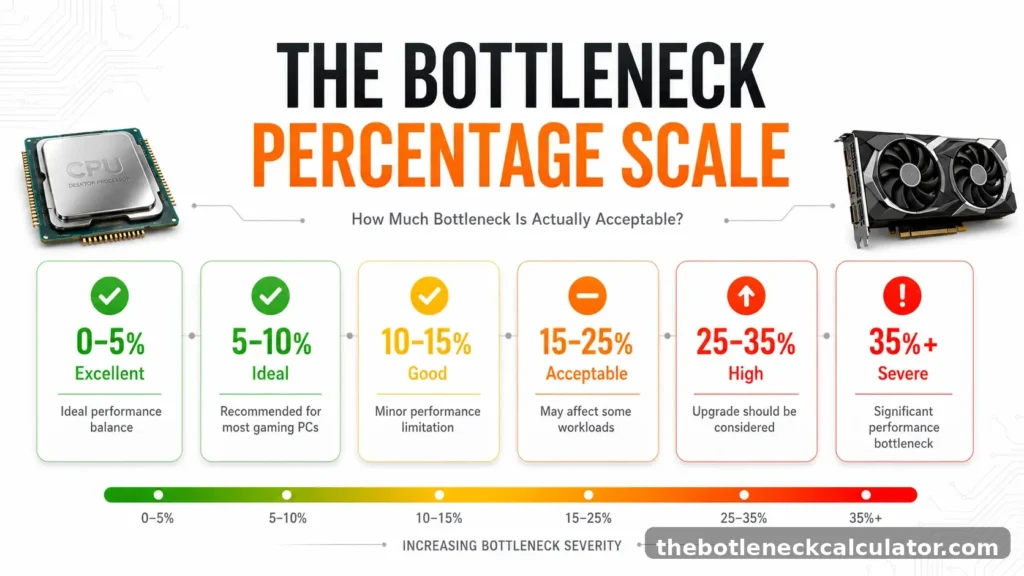
Six zones, each with its own real-world effect and its own next step. These numbers come from testing at 1440p, since that’s the resolution where CPU bottlenecks show up most clearly for the average gaming setup.
| Bottleneck % | Label | GPU Utilization | Action |
|---|---|---|---|
| 0–5% | Ideal | 95–99% | Nothing to do here |
| 5–10% | Excellent | 90–95% | Enable XMP (your RAM’s speed profile) and Resizable BAR (a BIOS setting that lets your CPU access the full GPU memory at once) |
| 10–15% | Good, Watch It | 85–90% | Barely noticeable, but keep an eye on it |
| 15–25% | Moderate | 75-80% | Start planning an upgrade in the next few months |
| 25–35% | High | 65–75% | Upgrade the weaker component soon |
| 35%+ | Severe | Below 65% | Upgrade immediately, this is costing you real performance |
One important detail many people overlook is that the percentage itself doesn’t change with your frame rate. What changes is how many frames you’re actually losing.
Say you’re averaging 60 FPS. A 10% bottleneck there costs you roughly 6 frames. Now imagine a beastly rig pulling 300 FPS with that same 10% bottleneck. Suddenly you’re down 30 frames. The math stays identical. What changes is how much it actually hurts.
Why 0% Bottleneck Is Physically Impossible — And Why That’s Fine
Every frame your game renders follows the same basic handoff. Your CPU figures out what needs to happen next, physics, positioning, game logic, then hands that information to the GPU, which actually draws the frame on screen. That handoff always takes a moment. Never zero.
That small delay comes from how modern graphics APIs like DirectX 12 and Vulkan talk to your hardware. Even on a perfectly matched system, this communication overhead eats up roughly 2 to 4 percent of your performance. Every gaming PC ever benchmarked carries this floor. If a tool ever shows you a flat 0%, it’s rounding a small number down, not measuring an actual perfect system.
Real example: A Ryzen 7 7800X3D paired with an RTX 4080, arguably one of the best-matched high-end combos you can buy right now, still lands at 3 to 5% in most games at 1440p. That’s not a flaw. That’s just the physical floor of how PCs work.
So stop chasing zero. The real goal is landing your build inside that 0–10% “GPU-limited” zone we covered earlier, where your graphics card is the ceiling, not your processor. Anything in that range is a solved problem, not something to keep tinkering with.
If your number comes back higher than that, a few BIOS tweaks and resolution changes can often bring it down fast, we’ll walk through the exact fix-it process in a dedicated guide.
How Resolution Rewrites Your Bottleneck Percentage — Same Hardware, Completely Different Answer
Same CPU. Same GPU. Completely different bottleneck number, just by changing your monitor’s resolution. A Core i5-13600K paired with an RTX 4070 Ti can show a CPU bottleneck north of 25% at 1080p, then drop to under 12% at 1440p, with zero parts swapped.
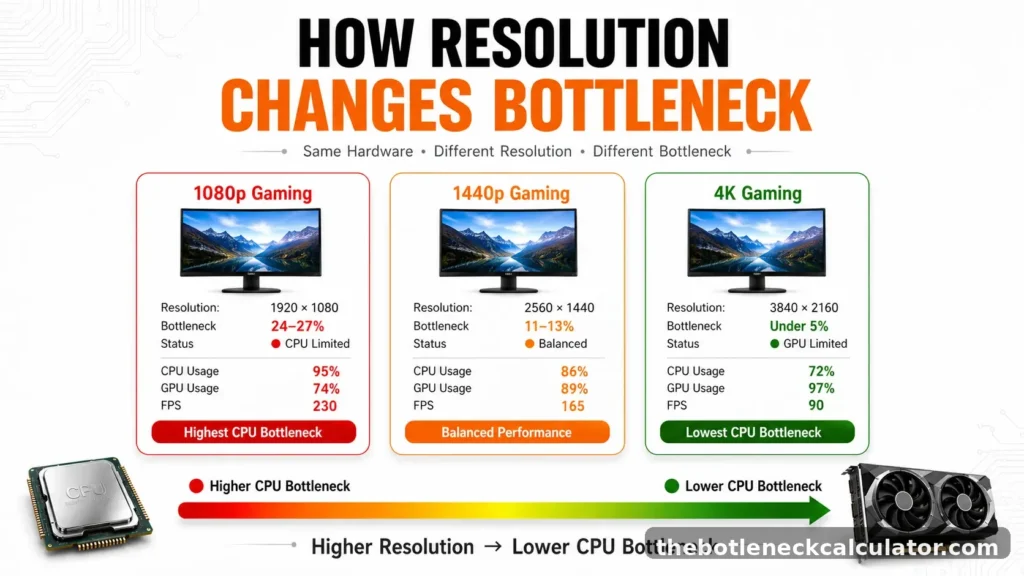
The reason is simple. At 1080p, the GPU finishes rendering each frame quickly and ends up waiting on the CPU to prepare the next one. Push the resolution to 1440p, and the GPU suddenly has far more pixels to draw per frame, giving the CPU enough breathing room to keep pace. At 4K, the GPU’s workload per frame is so heavy that CPU prep time barely registers anymore.
| Resolution | Bottleneck % | GPU Utilization | Verdict |
|---|---|---|---|
| 1080p | 24–27% | 74% | Significant, CPU is the limit |
| 1440p | 11–13% | 89% | Moderate, mostly fine |
| 4K | Under 5% | 97% | GPU-limited, ideal |
Most people see a high bottleneck number and immediately think “I need a new CPU.” Often, the actual fix costs nothing. If you’re running 1080p and your calculator flags a steep bottleneck, bumping up to 1440p alone can cut that number nearly in half, no upgrade required.
How Game Type Changes What Bottleneck Percentage Is Actually Acceptable
A 10% bottleneck doesn’t hit the same in every game. The frame loss itself is fixed math, but whether that loss actually matters depends completely on what you’re playing and what frame rate you’re chasing.
| Scenario | Target FPS | 10% Bottleneck Costs | Verdict |
|---|---|---|---|
| Single-player story game (1440p) | 60 FPS | −6 FPS | Barely noticeable |
| Open-world / strategy title | 90 FPS | −9 FPS | Mild, rarely felt |
| High-refresh shooter (144Hz) | 144 FPS | −14 FPS | Borderline, may miss refresh target |
| Competitive esports (240Hz) | 140 FPS | −24 FPS | Real disadvantage |
Competitive Shooters and Esports Titles
These games run on lower graphics settings by design, which pushes most of the workload onto your CPU. A 10 to 15% bottleneck is usually tolerable here, but only if your average frame rate still clears your monitor’s refresh rate. The moment your 1% lows dip during a firefight, even a modest bottleneck starts costing you actual gunfights.
Open-World, Strategy, and Simulation Games
Titles like large-scale strategy games or open-world RPGs constantly juggle AI, physics, and world simulation, which keeps your CPU busy no matter how strong your GPU is. A bottleneck up to 20% is common and mostly harmless here, since these games don’t demand split-second reactions the way competitive titles do.
Graphically Heavy Story Games
These games are built to max out your GPU, and that’s exactly what you want. A GPU sitting at 95 to 100% usage while your CPU coasts isn’t a problem, it’s the healthy state. Trouble only starts once the imbalance pushes past 20%, where your GPU is left waiting instead of working.
The real takeaway is that the same bottleneck percentage doesn’t have the same impact in every game. That holds up for a single-player game at 60 FPS, six lost frames won’t register. Play Counter-Strike 2 at 240Hz with that same 10%, and you’ve just handed away 24 frames, along with your reaction-time edge over the player who didn’t.
Why Forum Rules, YouTube Benchmarks, and Vendor Claims All Get This Wrong
Three sources shape most of what people believe about bottleneck thresholds, and all three are confidently right for the wrong audience.
The Forum Rule: Anything Under 10% Is Fine
This advice sticks around because it’s true, just not for everyone repeating it. At 1440p targeting 60 to 100 FPS in a non-competitive game, a 10% bottleneck genuinely doesn’t matter. The trouble is who’s actually asking. Someone running 1080p at 240Hz in a competitive shooter is a completely different case, and that same 10% costs them real, measurable performance.
YouTube Benchmarks: Different Setups, Different Truths
Two channels can test the exact same CPU and GPU pairing and land on completely different bottleneck numbers, both correct. The gap usually comes down to undisclosed test conditions: resolution, whether XMP or Resizable BAR was enabled, and which specific game was used. A reviewer testing at 1440p with XMP on gets one result. Another testing at 1080p without it gets a very different one, on identical hardware. Neither is lying. Neither showed their full settings either.
Vendor Claims: Zero Bottleneck Guaranteed
We already covered this: a true 0% bottleneck doesn’t exist on any real system. What vendors usually mean is GPU-limited performance at a high resolution, where CPU overhead becomes small enough to ignore. That’s a genuinely good result. Calling it “zero,” though, sets an impossible bar that makes an honest 3 to 5% look like a problem when it isn’t one.
| Source | What They Claim | What’s Missing | When They’re Right |
|---|---|---|---|
| Forums | Under 10% is always fine | Doesn’t account for frame rate target or game type | Single-player games at 1440p, 60–100 FPS |
| YouTube Benchmarks | Their measured result is the true number | Test conditions (resolution, XMP, Resizable BAR) rarely disclosed | When your setup matches theirs exactly |
| Vendor Claims | Zero bottleneck with this pairing | 0% is physically impossible, they mean GPU-limited | Accurate description, wrong label |
This is one of the biggest misconceptions about bottlenecks.
A bottleneck percentage doesn’t scale the same way across every game. A 15% bottleneck in a GPU-heavy title at 4K might only cost you 3 to 4 FPS. That same 15% in a fast-paced competitive shooter at 1080p can cost 30 or more, because that kind of game pushes far more strain onto your CPU’s draw call pipeline than a graphically heavy, slower-paced title does.
Four Scenarios — What Your Specific Bottleneck Percentage Actually Means
Most people land on this page for one of four reasons. Each situation needs a slightly different read on the same number.
You Just Ran the Calculator and Got a Result
Match your result against the scale above, but base it on the resolution you actually game at, not the default 1080p setting most calculators assume. Sitting under 10%? A quick BIOS trip to turn on XMP and Resizable BAR frequently brings a mid-teens percentage well into single digits. Sitting above 20%? Fix that component first. Nothing else you buy will matter until it’s addressed.
You Saw a Number Quoted on a Forum or in a Video
Treat it as a starting point, not gospel. Their resolution, memory speed, and BIOS configuration are almost certainly different from yours, which means their 20% could easily be your 11%. The only number that actually applies to you is the one from your own setup.
You’re Planning a New Build
Your target resolution decides how tightly matched your parts need to be. Chasing high refresh rates in competitive games at 1440p, aim under 8%. Building for single-player AAA titles at 1440p, anything under 15% is fine. At 4K, most current-generation CPUs naturally land in the ideal zone regardless of pairing, since the GPU workload dominates.
| Resolution | Bottleneck % | GPU Utilization | Verdict |
|---|---|---|---|
| 1440p | ~9% | 92% | Acceptable |
| 1080p (same hardware) | ~21% | 76% | Moderate |
Same CPU, same GPU, same game, one resolution change is the difference between fine and borderline.
You’re Already Seeing Poor FPS and Suspect a Bottleneck
Open a monitoring tool like MSI Afterburner while you’re actually in a game, not sitting in a menu. GPU utilization under 85% with a CPU core group pegged near 90% or higher means you’re CPU-bound.
GPU utilization above 95% with FPS still disappointing means the GPU itself is the limit, more GPU power is the only real fix. If both components look low at the same time, that’s usually a driver problem, RAM running below its rated speed, or Resizable BAR sitting disabled, all free fixes worth trying first.
CPU Bottleneck vs GPU Bottleneck: Key Differences
Knowing your bottleneck percentage without knowing which part is causing it doesn’t help much. Fix the wrong component and you’ve spent money without solving anything. Here’s how the two actually differ.
| Category | CPU Bottleneck | GPU Bottleneck |
|---|---|---|
| Most common trigger | High-refresh 1080p gaming with a strong GPU | 4K or high-detail gaming with an older GPU |
| Where it shows up most | Competitive shooters, strategy games, open-world titles | High-resolution gaming, ray tracing, creative rendering |
| Usually caused by | An aging or low-core-count processor | An entry-level or several-generations-old GPU |
| Fastest free fix | Raise your resolution or lower CPU-heavy settings | Lower resolution or scale back graphics settings |
| Real fix | Upgrade the CPU | Upgrade the GPU |
A GPU sitting at full load while the CPU has room to spare almost always means the graphics card is your limiting factor, and in most cases, that’s actually fine since it’s the state you want at higher resolutions. The reverse, a maxed CPU with a GPU that’s coasting, means you’re leaving performance on the table no matter how good your graphics card is.
One thing worth remembering: a bottleneck in the 15-20% range usually shows up as occasional frame dips rather than a constant, obvious FPS drop. It’s not always as dramatic as people expect.
Signs Your Bottleneck Percentage Is Too High
A high bottleneck doesn’t always show up as an obvious problem. Watch for these signs before it starts costing you real performance or money.
- Lowering your graphics settings doesn’t raise your FPS If dropping resolution or turning down visual settings barely moves your frame rate, your GPU was never the limit to begin with, your CPU is.
- Your frame rates lag behind identical hardware setups If someone running the exact same CPU and GPU combo is getting noticeably higher FPS in the same game, something in your system is holding the pairing back.
- Stuttering continues even after you’ve reduced graphics settings Micro-stutters that persist regardless of visual settings usually point to a processing bottleneck rather than a graphics one.
- A recent upgrade barely moved the needle If you swapped in a faster GPU and performance improved far less than expected, the CPU is likely now the limiting factor.
- High CPU usage shows up in games that shouldn’t be CPU-demanding If a visually simple or older title is somehow maxing out your processor, that’s a red flag worth investigating.
- One component sits idle while the other is maxed, and it only happens during gaming If everyday desktop use runs smoothly but gaming performance tanks, open Task Manager during a session, one part working overtime while the other coasts confirms an imbalance.
If two or more of these sound familiar, it’s worth running the numbers through a bottleneck calculator to confirm which component is actually holding you back before spending on an upgrade.
Quick Summary: Good Bottleneck Percentage at a Glance
If you just want the key takeaways, here’s a quick summary.
If you’re wondering what is a good bottleneck percentage, staying below 10% is generally a strong target for most gaming PCs.
✅ 0–5% — Ideal. GPU is the ceiling, nothing to fix.
✔️ 5–10% — Excellent. Minor overhead, no action needed.
🔹 10–15% — Good, but worth watching. Barely noticeable in most games.
⚠️ 15–25% — Moderate. Start planning an upgrade in the next few months.
🔶 25–35% — High. Upgrade the weaker component soon.
🚨 35%+ — Severe. Upgrade immediately, this is costing real performance.
The goal isn’t to chase a perfect 0% bottleneck. The goal is to build a balanced system that delivers the performance you actually want. If your bottleneck stays under 10% and your games run smoothly, you’re already in a great place.